What Is a P2P Network? (Peer-to-Peer Explained Simply)
Have you ever downloaded a file and noticed it was coming from many people at once instead of one website? That’s a P2P network in action.
1/4/20261 min read
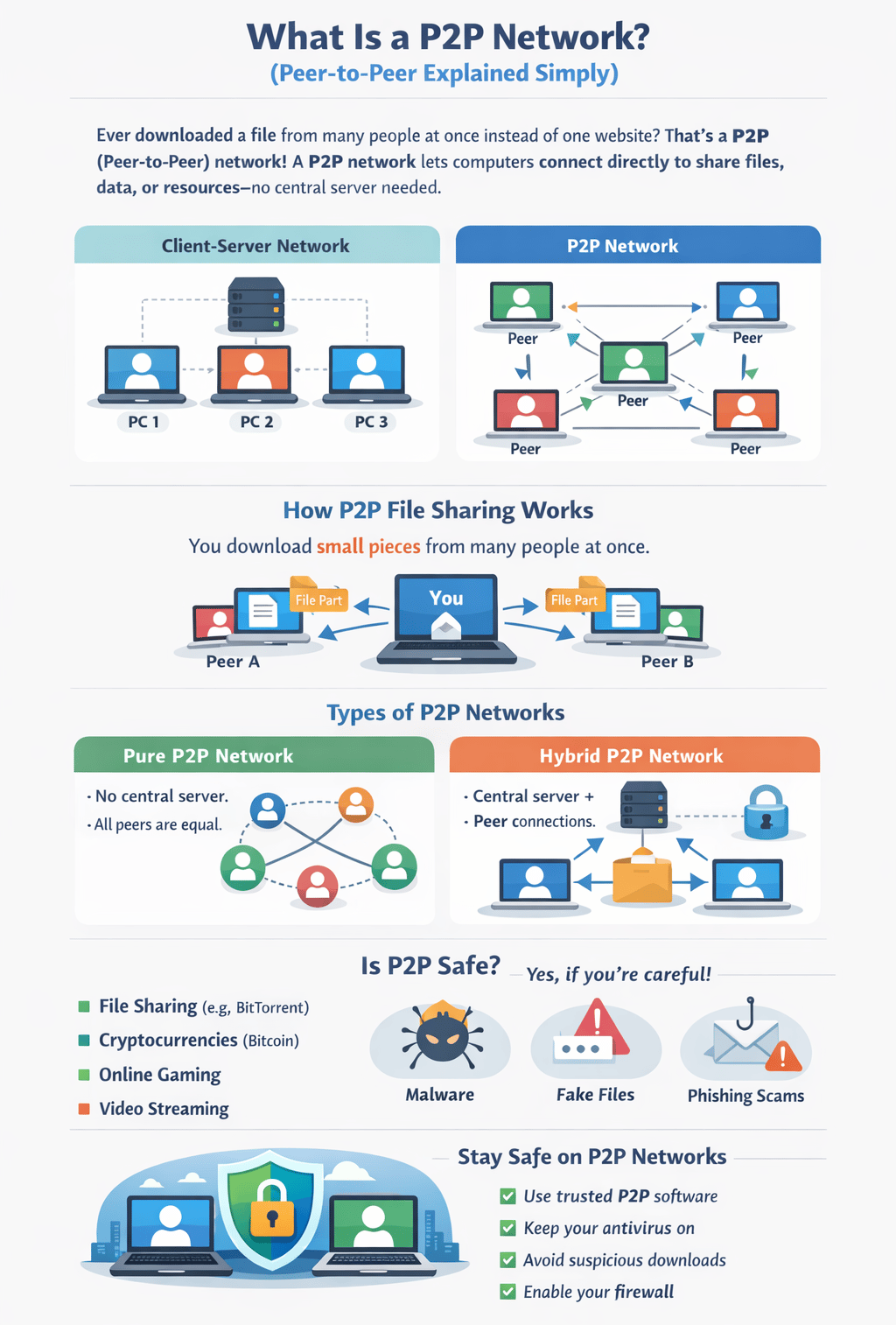
A P2P (Peer-to-Peer) network allows computers to connect directly to each other to share files, data, or resources — without relying on one central server.
Think of it like neighbors sharing tools instead of everyone going to one store.
What Does “Peer-to-Peer” Mean?
In a P2P network:
Every computer is called a peer
Each peer can send and receive data
No single computer is “the boss”
Everyone helps everyone else 🤝
Traditional Client-Server Network
How this works:
One central server stores everything
All computers depend on that server
If the server goes down — everything stops ❌
This is how most websites work.
P2P (Peer-to-Peer) Network
How this works:
Computers connect directly
Everyone shares data with each other
If one peer goes offline, the network still works ✅
This is faster, flexible, and more resilient.
How P2P File Sharing Works (Real-Life Example)
Let’s say you’re downloading a large file:
Instead of downloading it from one server:
You download small pieces from many people
Each person sends you a different part
Your computer puts it all together
Result: Faster downloads
This is how BitTorrent and similar platforms work.
P2P File Sharing Visual & Types of P2P Networks
Pure P2P Network
No central server at all
All peers are equal
Harder to manage, but very decentralized
Hybrid P2P Network (Most Common)
A server helps peers find each other
Files are still shared peer-to-peer
Faster and more reliable
Most modern P2P systems use this model.
Where Are P2P Networks Used Today?
You might be using P2P without realizing it:
📂 File sharing systems
🪙 Cryptocurrencies (Bitcoin, Blockchain)
🎮 Online gaming
📺 Video streaming platforms
💬 Communication apps
Is P2P Safe?
P2P networks can be safe, but only if used correctly.
Common Risks:
⚠️ Malware hidden in downloads
⚠️ Fake files and phishing links
⚠️ Data exposure if security is weak
Diagram 4: P2P Security Concept
[Peer] 🔒 ↔ 🔒 [Peer] Protected Data Exchange
How to Stay Safe on a P2P Network
Here are simple safety tips anyone can follow:
✅ Use trusted P2P software
✅ Keep antivirus and firewall enabled
✅ Never click unknown links
✅ Avoid suspicious downloads
✅ Keep your computer updated
👉 If you’re not confident doing this alone, contact an IT support professional for help.